Plan, build and assure the people who keep the world online.
FacilityVR brings strategic workforce planning, facility demand forecasting, career architecture, verified credentials, supervision, mentoring and contractor assurance into one capability system—powered by evidence from the workplace, external qualifications and whole-facility simulation training.
Combine external credentials, supervised workplace evidence and realistic simulation to see who is ready, who needs support and what capability is at risk.
Forecast the people and skills every facility will need.
Build careers, supervision and capability at scale.
Verify readiness across employees and contractors.
THE INDUSTRY CONSTRAINT
Data centres cannot staff continued growth by hiring from one another.
Every new facility increases demand for technicians, specialists and leaders while the experienced workforce is already stretched. Sustainable growth depends on enlarging the talent pool: attracting people who are new to data centres, retraining people from adjacent industries and helping existing employees to move into new roles.
Operators need more than additional courses. They need to forecast workforce demand from planned capacity and plant, define roles and pathways, verify qualifications and authorisations, coordinate supervisors and mentors, assure contractor capability and turn every source of evidence into an accurate view of readiness.
FacilityVR connects workforce supply, facility demand and evidence of capability, reducing burden on individual operators and enabling an industry-wide approach.
Unified capability system
Plan the workforce. Build capability. Assure coverage.
FacilityVR’s Workforce Development vision connects the plant, positions, people, credentials, evidence and partners that determine whether each site can operate safely today—and scale tomorrow.
Workforce Development vision
01 / PLAN
Strategic workforce planning
Compare workforce demand and supply by site, role, skill and quarter. Model build, buy and borrow actions before gaps become operational constraints.
Base, growth and stress scenarios
Attrition, retirement and pipeline assumptions
Build, hire, partner or contractor responses
02 / FORECAST
Facility demand forecasting
Turn commissioned and planned MW, halls, asset profiles, crew patterns and service levels into future headcount and skill demand.
Capacity-to-role staffing ratios
Plant and equipment capability demand
Forecast coverage and single points of failure
03 / STRUCTURE
Career structure & position management
Define job families, role profiles, levels, positions, requirements and pathways so planning, development and internal mobility use one language.
Vertical and lateral career paths
Site, hall, team and crew structure
Succession slates and readiness horizons
04 / VERIFY
Credentials, qualifications & authorisations
Bring statutory licences, qualifications, industry and OEM certifications, safety tickets and internal site authorisations into one verified record.
Source verification and jurisdiction rules
Expiry, renewal and currency monitoring
Compliance matrices by site and role
05 / DEVELOP
Supervision & mentor facilitation
Match learners with eligible supervisors, mentors, buddies and assessors while checking credentials, ratios, independence, shift alignment and workload.
Supervised hours and workplace sign-off
Mentor matching around career goals
Progression from supervised to independent
06 / ASSURE
Contractor capability verification
Check the people supplied by facilities contractors against each site’s role, credential and currency requirements—without losing the employment boundary.
Named or aggregate capability sharing
Client-site authorisation and coverage
Portable evidence across operator relationships
EmployeesRoles, readiness, careers and succession
ContractorsVerified capability for each client site
AcademiesCohorts, outcomes, funding and conversion
ProvidersTime to competence, quality and cost
The whole workforce lifecycle
From market entry to succession.
One capability model follows people from candidate and training pipelines into positions, development, authorisation, internal mobility and leadership—not just through isolated training events.
01ATTRACT
Grow the pipeline.
Connect careers experiences, training cohorts, partners and labour-market demand to real future roles.
02PLACE
Put people in context.
Map employees, contractors and candidates to legal entities, sites, teams, positions and role requirements.
Combine credentials, workplace observation, operational evidence and simulation with currency and jurisdiction rules.
05MOBILISE
Build the next bench.
Make career paths, internal mobility, succession readiness and the actions needed to close each gap visible.
Workforce Development vision
For people starting out
Thinking of a data centre career?
The data centre industry is booming worldwide. Ask about open jobs, career events, the roles and how to get into them, and courses you can take on FacilityVR to get job-ready.
Bring together planned capacity, plant and equipment, crew rules, positions, current capability, credential expiry, contractors, rosters, trainee and provider performance. Simulation contributes evidence; it is not the whole workforce picture.
Workforce Development vision
SHIFT COVERAGE
Is there someone on tonight’s shift at Site A who is authorised for MV switching—and has rehearsed it in the last 90 days?
CAPACITY PLANNING
Hall 3 comes online in March. How many technicians does it need, with which skills, and where will they come from?
SUCCESSION
Which of our technicians could step up to shift lead in the next year?
CURRENCY & SCHEDULING
Who is overdue for the annual LOTO refresher—and will next week’s training leave night shift short?
TRAINEE PIPELINE
Are our training provider's students on track, and is the funding claim for their first block ready?
PROVIDER QUALITY
Which provider gets new hires to competence fastest—in Virginia, Dublin and Melbourne?
Facility and role demandWhat each site and shift needs
Verified capabilityWhat each person can do, where and how recently
Workforce supplyEmployees, candidates, academies and providers
Connected systemsHRIS, rosters, CMMS and external learning records
Simulation as workforce evidence
Build experience where live operations cannot.
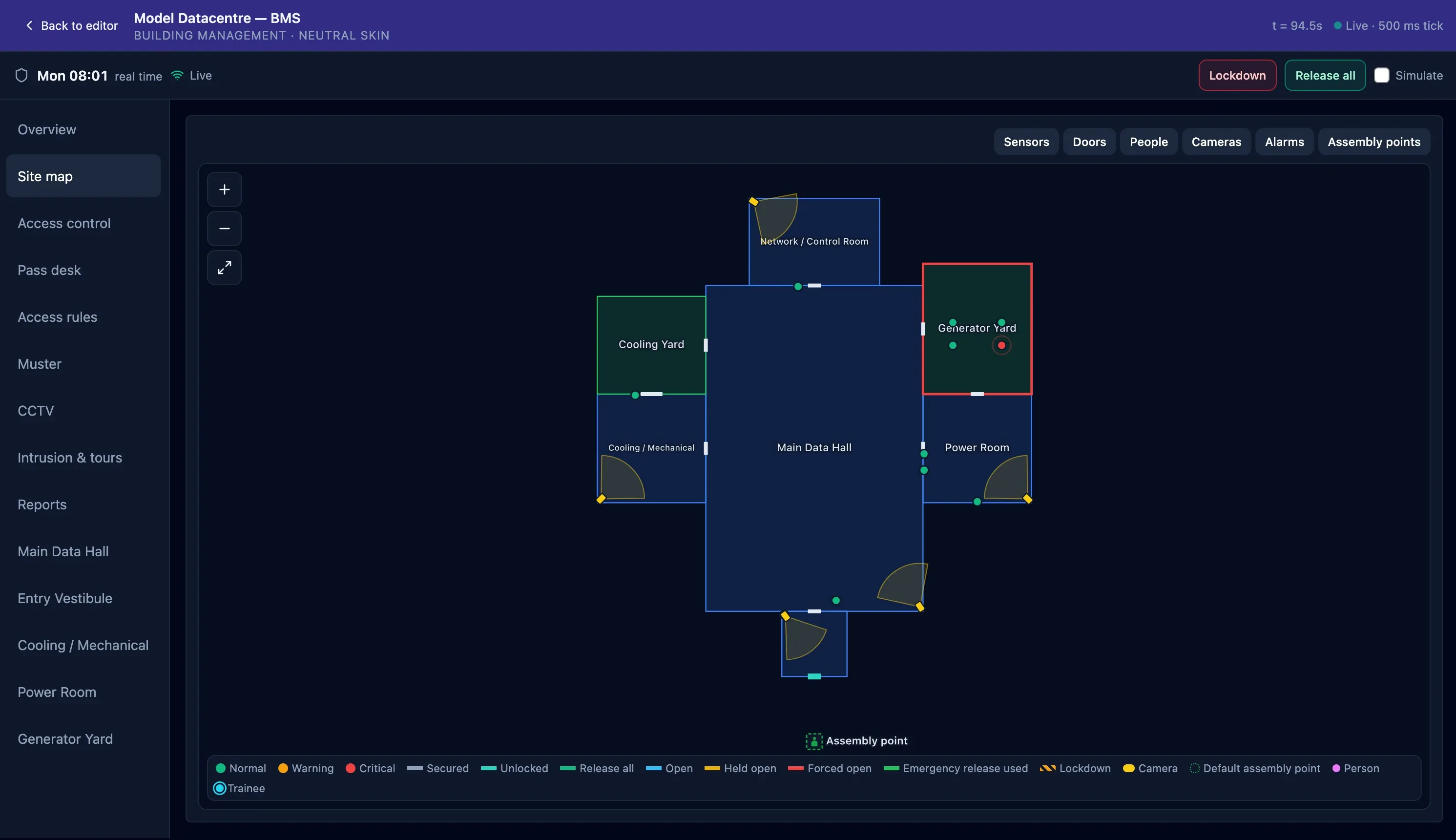
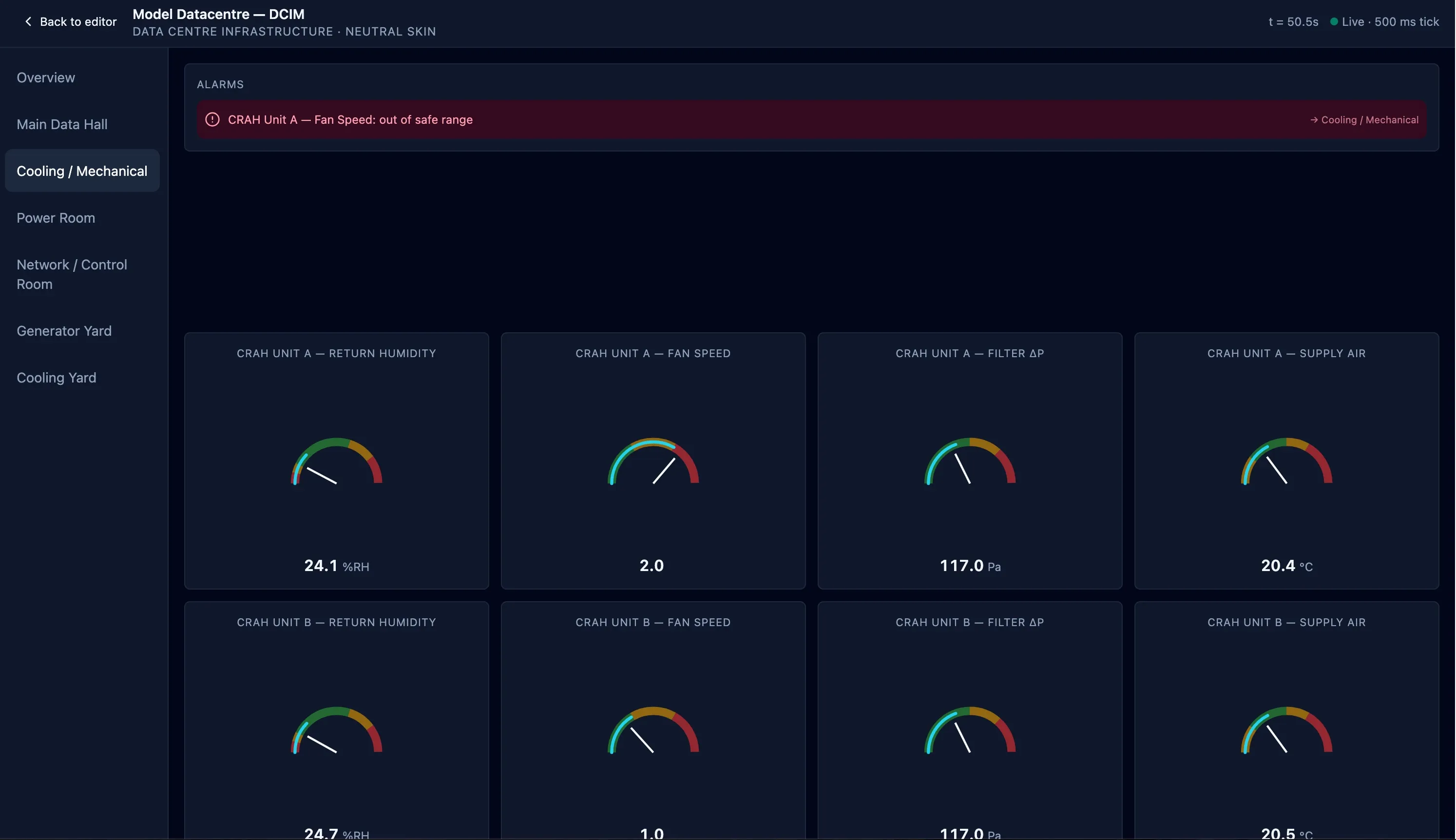
Facility Labs builds the operating world your people need to understand. Exercises can connect the navigable 3D facility with BMS or DCIM, telemetry, access control, CCTV, alarms, life safety, weather and local site time.
01 Add evidence of procedure performance, recency and decision-making to the capability record.
02 Let a technician in the facility and a BMS or DCIM operator work the same run.
03 Give new hires and role transfers safe experience before workplace exposure and authorisation.
04 Make rare and high-consequence events repeatable, with courseware and procedures alongside.
Model Datacentre · Live simulation
Real FacilityVR product views
Operate doors, people, alarms and assembly points in the same simulated facility.See the shared 3D environment through live simulated CCTV views.Connect alarms and telemetry to the decisions technicians make in the facility.
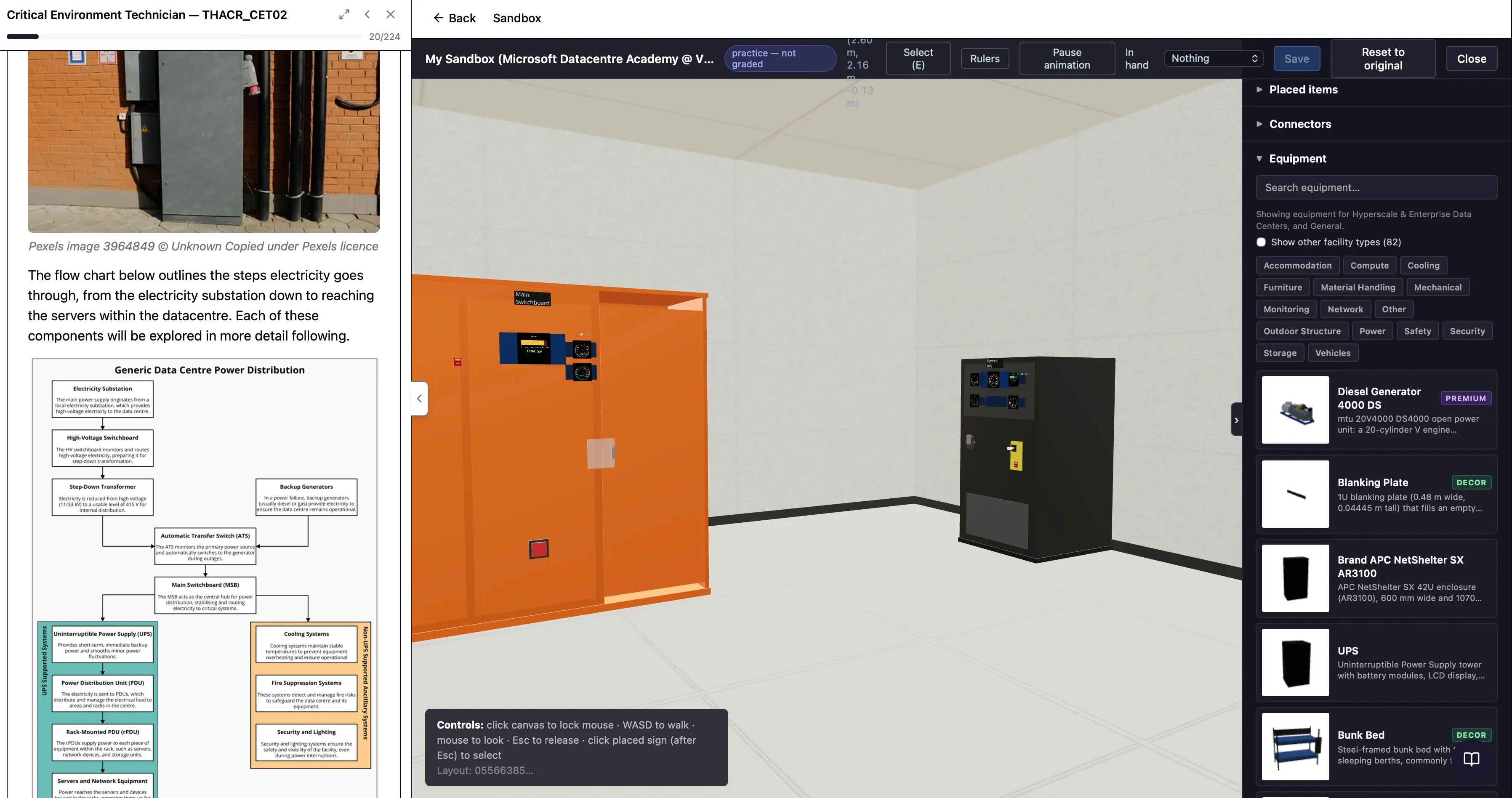
Context-relevant courseware and the live facility simulation, side by side.
Learning beside the work
Guidance, decisions and practice in one flow.
FacilityVR places courseware and the live 3D experience side by side. Learners can read, watch, decide and act without breaking context—on desktop or in immersive VR.
Move from guided rehearsal to independent practice and formal assessment in the same environment.
Client success story
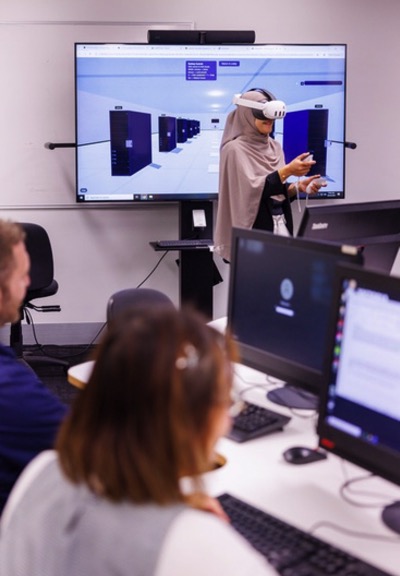
Victoria University · Microsoft Datacentre Academy
Simulating critical infrastructure for the next generation of data-centre technicians.
Victoria University selected FacilityVR to create virtual-reality tools for its Microsoft Datacentre Academy. Students can explore and practise around large-scale critical infrastructure safely, repeatedly and with learning content beside the simulated work.
Safe access to environments that are difficult or impossible to practise in live
Repeatable hands-on experience before workplace exposure
Technical knowledge connected directly to equipment, procedures and decisions
Simulation is one powerful evidence source. FacilityVR’s Workforce Development vision also uses positions, external credentials, qualifications, workplace observation, CMMS records, rosters, provider outcomes and planned facility change.
▦DEMAND
Capacity, plant & cover
MW, planned halls, asset profiles, crew patterns and service levels.
→
⌁STRUCTURE
Positions, roles & paths
Job families, levels, requirements, teams, positions and career moves.
→
✓EVIDENCE
Capability from every source
Credentials, qualifications, workplace evidence, operations and simulation.
→
◎DECISIONS
Plans, coverage & mobility
Gaps, expiry risk, contractor assurance, succession and development actions.
Workforce Development vision
MANAGED APPLIANCE
Delivered for operational reality
Your environment. Your operating boundary.
Facility Labs works with you to configure the capability framework, structures, demand model, integrations, content and simulation your organisation needs. Deploy through secure public cloud, or run a managed FacilityVR appliance behind your own firewall.
See how FacilityVR can connect your facility plan, workforce strategy and evidence of readiness.